From Push to Production: Our Deployment Pipeline with Argo CD
When you’re building an LMS product, you want your deployment pipeline to be the opposite of exciting. Not because deployments aren’t important — because they’re too important....
When you’re building an LMS product, you want your deployment pipeline to be the opposite of exciting.
Not because deployments aren’t important — because they’re too important.
We’re OpenMirai: a startup building an LMS that lets users create their own organizations and publish courses easily. That means we ship often, but we also can’t afford to break learning flows, publishing, payments, or anything that creators rely on.
Check us out! https://openmirai.com
So we built a pipeline that’s intentionally “boring”: GitHub pull requests, GitHub Actions, Kubernetes, and Argo CD — split across staging and production.
This post is a walkthrough of how a feature goes from a developer’s machine to real users, and why we made the choices we did.
The tools we use
Our core deployment stack looks like this:
- Kubernetes for running services
- Argo CD for GitOps-style deployments
- GitHub Actions for CI and automation
- GHCR (GitHub Container Registry) for container images
- Two environments: staging and prod
We also use feature flags via PostHog for risky or early features, but that’s a whole separate topic (we’ll talk about it later posts).
High-level flow
Code changes land in staging first, we test + regress internally, then promote to production during off-peak hours.
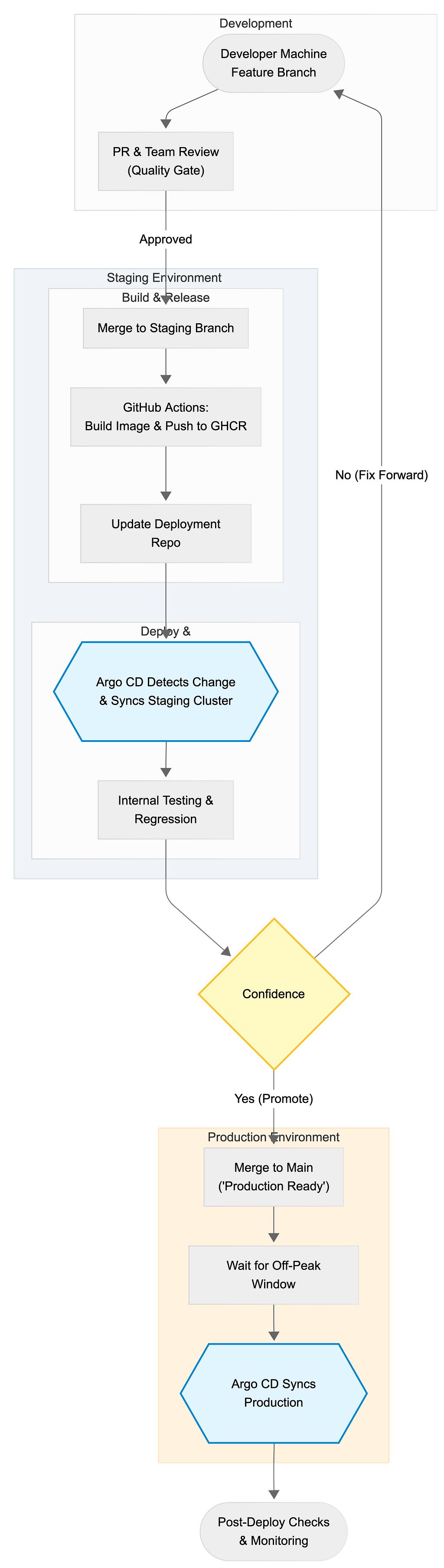
Let’s break this down with what actually happens and why.
Step 1: Feature branches keep the mainline clean
We usually start Feature A from main (or sometimes from staging, depending on the pace), and do normal engineering work in a dedicated branch.
Feature branches are less about “perfect isolation” and more about giving us a clean unit for:
- reviewing changes
- running CI
- linking discussions to code
- deciding whether we’re ready to ship
Step 2: PR review is our first “quality gate”

When a feature is ready, we open a PR and review as a team.
This part is underrated. PR review is where a lot of risk gets caught early:
- unintended side effects
- missing migrations
- edge cases in permissions
- “works on my machine” gaps
- improvements to tests and observability
We don’t treat PRs as bureaucracy. We treat them as the last calm moment before we introduce change into a shared environment.
Step 3: Merge to staging (not production)

After the PR passes, we merge to staging.
This is a deliberate design: staging is our integration environment. It’s where code meets reality — real services, real dependencies, real configs, real network paths.
If something is going to fail in Kubernetes, staging is where we want it to fail.
Step 4: GitHub Actions builds and pushes the image
Once code hits staging, GitHub Actions does the repetitive stuff humans shouldn’t do:
- build the container image
- tag it (we prefer immutable references) ex. sha-256
- push it to GHCR
This is one of the reasons container-based delivery is nice: we deploy artifacts, not “whatever happens to be on a VM.”
Step 5: GitOps with a single deployment repository
We have a separate repository for deployments — internally we call it openmirai deploy.
This repo contains our Kubernetes manifests (or kustomize/helm configs), and it’s the source of truth for what’s running in each environment.
Here’s the key detail:
Our GitHub Action updates the deployment config by writing the new image SHA into the relevant Kubernetes deployment file.
So instead of “pushing” deployments, we commit desired state.
That means:
- you can see every deploy as a git diff
- rollbacks are a git revert
- Argo CD just follows what’s in git
It also means Argo CD doesn’t need special human intervention for staging.
Step 6: Argo CD automatically deploys to staging
Argo CD continuously watches the deployment repository.
When it sees a change — like a new image SHA — it reconciles the cluster to match.
So the flow becomes:
git commit → Argo CD sync → pods roll → staging updated
This is what we like about GitOps: it turns deployments into a controlled, auditable change to a repository rather than a manual ritual.
Step 7: Internal testing and regression in staging
Once the new version is live in staging, we do internal testing:
- happy path checks
- regression checks (things that often break)
- sanity checks for performance or error spikes
- sometimes a short “dogfooding” window for the team
If we’re not confident, we don’t promote. We fix forward and repeat.
If the feature is early, risky, or only meant for a subset of users, we’ll ship behind a feature flag (PostHog) so code can be in prod without being enabled for everyone.
Step 8: Merge to main only when we’re confident
Once staging looks good, we merge to main.
This is our “promote the codebase” step.
We’ve learned that treating main as “what we believe is production-ready” keeps the team aligned. It also makes hotfixes and rollbacks less chaotic.
Step 9: Production deploys are scheduled for off-peak
Production deployments happen during off-peak hours for us — typically 23:00–01:00.
This is partly about reducing user impact, but it’s also about giving ourselves a calm window to watch the release.
Yes, automated continuous deployment is cool. But early-stage teams don’t always need “ship anytime.” Sometimes they need “ship safely.”
So we prefer intentional production releases, at predictable times.
Step 10: Post-deploy checks

After production deploy, we do postchecks:
- key user flows (login, course access, purchase/publish)
- service health dashboards
- error rates and logs
- any alerts from monitoring
This part is boring, and that’s exactly why it works.
Why this pipeline works for us
A few principles we optimize for:
1) Staging is where surprises belong
We’d rather discover issues internally than through customer messages.
2) Git is the deployment history
Every change is a diff. Rollbacks are simple. Auditing is easy.
3) Automation handles the boring parts
Humans make decisions. Machines build artifacts and update manifests.
4) Production releases are deliberate
We ship frequently, but we keep a clear “promotion” step and deploy at quiet hours.
What we’ll improve next
Even “boring” pipelines evolve. Some areas we’re actively thinking about:
- better automated regression checks
- canary or progressive delivery for specific services
- more visibility into “what changed” in each deploy
- tighter coupling between feature flags and deployments
And yes, feature flags deserve their own post — especially how we use PostHog to reduce risk while still shipping early.
Closing thoughts
A deployment pipeline isn’t just a DevOps diagram. It’s a product decision.
For us, GitHub Actions + GHCR + a single deployment repo + Argo CD gives us a clear, low-stress path from push to production — without making deployments a “hero activity.”
If you’re building a multi-tenant product where reliability matters, I’d strongly recommend keeping your pipeline boring.
Boring ships.